
Know where your vehicles and trailers are, right now
Geo-Trac tracks trucks, vans, trailers and equipment on the road with live location, location history and movement alerts, plus engine and fuel data from vehicles with an OBD dongle, all on the same dashboard you use for the rest of your assets.
Without visibility, a fleet costs more than it should
Where is it?
Calls and texts to find a truck or trailer cost time, and customers notice when answers are slow.
Unexplained time and trips
Without a location history, it is hard to confirm when a vehicle arrived, left or sat idle.
Theft and unauthorized use
A trailer that moves after hours or leaves an area it should not is a problem you want to hear about right away.
Track what moves
Vehicles, trailers, equipment and sensors on one dashboard, from one company.
Live location and trips
See where each vehicle is, then replay its trips with start, end, distance and duration. Export to Excel or a PDF report.
Geofences and alerts
Get an email when a vehicle arrives at or leaves an area you set, or moves when it should not, such as after hours.
Idling and utilization
See how long engines sit idling and how much each vehicle is used, so you can spot waste.
Vehicle data from an OBD dongle
A plug-in OBD dongle reads data the vehicle reports, such as speed, engine RPM, fuel level and fuel rate, oil and coolant temperature, and fault codes, and sends it to your dashboard.
Maintenance reminders
Service reminders and fault codes help you schedule repairs before a breakdown.
One dashboard, any screen
Vehicles, trailers, equipment run-time and sensors share one login, and you can log in from your phone’s web browser, with no app to install.
Fleet telematics here means location, movement, run-time and the vehicle data an OBD dongle can read. What a vehicle reports depends on the make, model and fleet, so ask us about yours. Geo-Trac does not currently offer dash cameras or ELD hours-of-service logging.
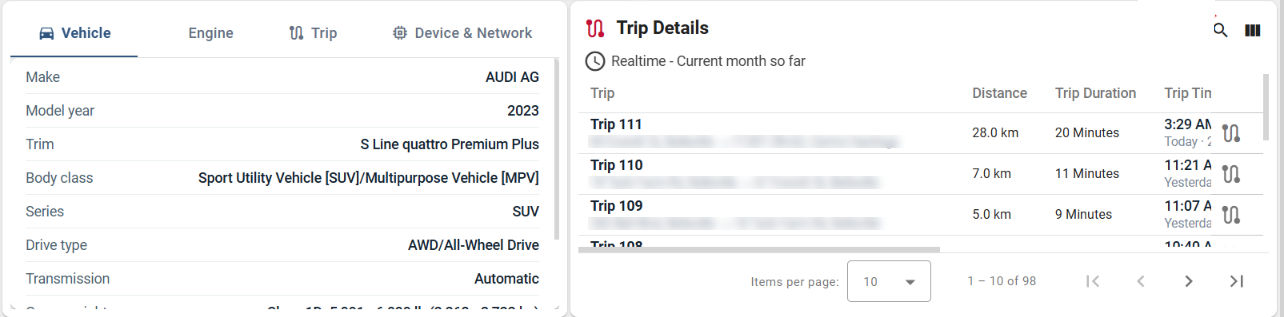
See every trip and the vehicle behind it
This is the Geo-Trac dashboard for one vehicle. Each trip lists its start and end, distance and duration, next to the vehicle’s details, and the page also shows live position, battery voltage and fuel.
Up and running in three steps
Plug in the dongle
The OBD dongle plugs into the vehicle’s diagnostic port. Installation takes about a minute.
See it on your dashboard
The vehicle appears on the map and starts reporting its location and engine data.
Set alerts, run reports
Choose geofences and limits, get an email when something needs attention, and export Excel or PDF reports.
Built for fleets like yours
Disaster restoration
Trucks, trailers and equipment on every job.
Equipment rental
Know where rental assets are and how much they run.
Construction
Vehicles and equipment across several sites.
Warehouses and yards
Vehicles, trailers and conditions in one view.
Wondering what visibility is worth? Try our savings calculator.
Questions about fleet telematics
What is vehicle telematics?
It combines GPS location with data from the vehicle, sent from a small device to a dashboard. You see where vehicles are, how they are used and when they need service.
How does the OBD dongle work?
It plugs into the vehicle’s OBD diagnostic port, reads the data the vehicle reports and sends it with GPS location to your Geo-Trac dashboard. Installation takes about a minute.
What vehicle data can it read?
Common readings include speed, engine RPM, fuel level and fuel rate, oil and coolant temperature, and fault codes. What a vehicle reports depends on its make, model and your fleet.
Can I track trailers and equipment that have no OBD port?
Yes. GPS beacons track trailers and other equipment, and accelerometer-based beacons detect when powered equipment is running.
Can I see vehicles together with my equipment and sensors?
Yes. Vehicles, trailers, equipment run-time and jobsite or warehouse sensors all appear on the same dashboard.
Can I export reports?
Yes. You can export data to Excel or a PDF report.
Do you offer dash cameras or ELD hours-of-service logging?
Not currently. Geo-Trac covers location, movement, run-time and vehicle data.
See your fleet on one map
Tell us how many vehicles and trailers you run, and we will set up a 20-minute walkthrough.